Share

Hayward AquaRite 900 Salt Level: 1700 vs -1700 Explained
Last updated: 3 Oct 2026
355 Views
Aquarate 900
Salt Chlorinator Guide | Hayward AquaRite 900

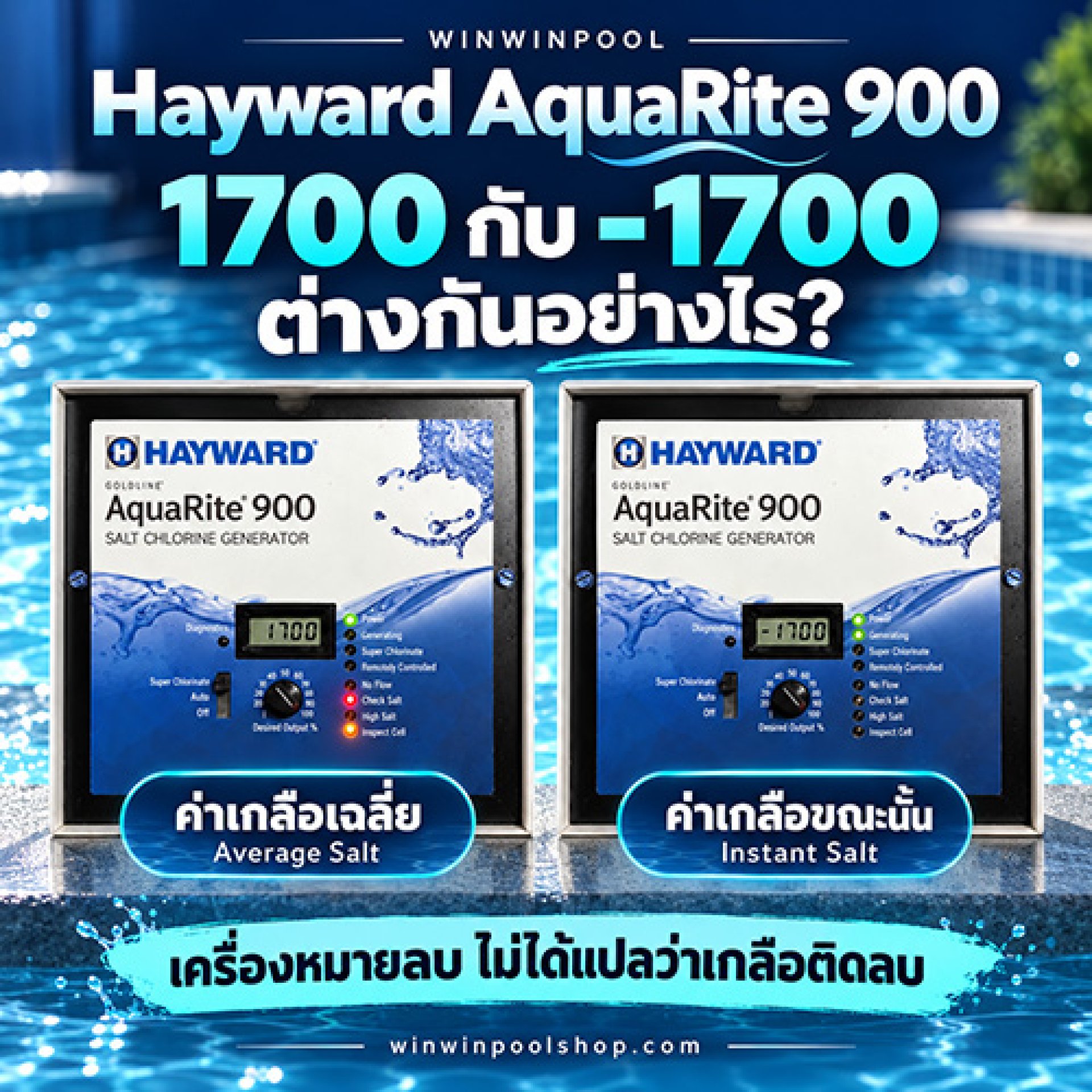
Hayward AquaRite 900: Whats the Difference Between 1700 and 1700?

Many pool owners see the minus sign and wonder if the unit is reversing the cell polarity. Heres what it really means.

Display shows
1700
Average Salt
Display shows
-1700
Instant Salt

What Do These Two Numbers Mean?

1

1700 No Minus Sign

This is the Average Salt level recorded by the unit: 1,700 ppm

2

1700 With Minus Sign

This is the Instant Salt reading at that moment: also 1,700 ppm

The sign simply identifies the Instant Salt display mode. It does not mean negative salt, and it does not indicate whether the cell is running in positive or negative polarity.

After adding salt, the Instant Salt reading may change first, while the average takes time to update. Thats why the two numbers may not match for a while.

Showing 1,700 ppm? Heres What to Check

The AquaRite 900 recommends a salt level of 2,7003,400 ppm, with an ideal level of about 3,200 ppm. If the reading is accurate, 1,700 ppm is below the recommended range.

1,700 ppm
 
Ideal 3,200
 
 
0
2,700
3,400
4,000
Below / above recommended range Recommended 2,7003,400 ppm

Checks to Do Before Adding Salt

1
Test the actual salt level separately
Use a separate salt meter or test kit to confirm the real salt level in the water before adding any salt.
2
Inspect the cell for scale
If the actual salt level is normal but the unit still reads low, check the cell plates for calcium scale buildup.
3
Check the cell type setting
Make sure the cell type configured in the control unit matches the cell actually installed.
4
Assess the cell condition
If readings are still abnormal after all the checks above, then evaluate the remaining life and condition of the cell.

A Check Salt or Inspect Cell light is a signal to investigate. It does not automatically mean the cell has failed and must be replaced.
RELATED PRODUCTS
WINWINPOOL SHOP

Hayward Salt Chlorinators for Swimming Pools

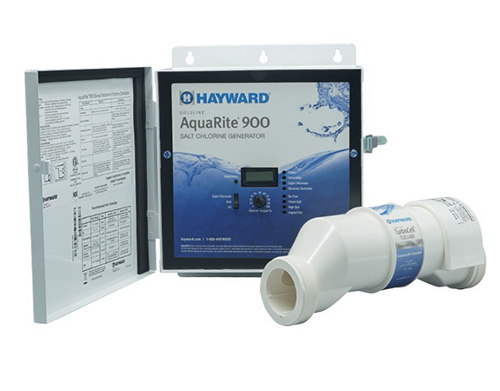
Looking for a Hayward salt chlorinator, or want to compare models for your pool? See the full product details on our Hayward salt chlorinator page.

View Hayward salt chlorinator models and details in one place
Choose the right model for your pool size and usage

Frequently Asked Questions

Does 1700 on the display mean negative salt?

No. The sign shows that this is the Instant Salt reading taken at that moment. The salt level is 1,700 ppm.

Does the minus sign mean the cell is reversing polarity?

No. The sign does not indicate positive or negative cell polarity. It only separates the salt display modes.

Why do the two readings differ after adding salt?

The Instant Salt reading changes first, while the Average Salt value takes time to update, so the numbers can differ at first.

What salt level should the AquaRite 900 have?

The recommended range is 2,7003,400 ppm, with about 3,200 ppm being ideal. Always confirm the actual level with a separate test kit before adding salt.

Understand your pool, fix problems at the source, and avoid unnecessary costs.

Have a question about pool equipment or systems? Talk to the WINWINPOOL team.
WINWINPOOL Everything For Your Pool
#Winwinpool #Hayward #AquaRite900 #SaltChlorinator #SaltwaterPool #PoolCare #PoolMaintenance

Related Content
How to troubleshoot Emaux CyberSync salt chlorine generator Check Cell / Check Water Level of Cell
⭐ Brief Summary Most Check Cell problems are caused by no water flow or loose cell cables. Check the flow and cable connectors for tightness. The system will resume operation and the warning message will disappear.
No FLow
The No Flow light on a Hayward AquaRite 900 means the system cannot detect water flow, and the unit stops producing chlorine. This can be caused by a genuine lack of flow or a flow switch problem. This guide walks you through the checks in order, covering the pump, valves, flow switch cable and installation direction, and explains the difference between a flashing and a steady light.
icon-messenger
This website uses cookies to enhance performance and provide you with a better user experience. You can read more details at: Privacy Policy and Cookies Policy