Share

How to troubleshoot Emaux CyberSync salt chlorine generator Check Cell / Check Water Level of Cell
Last updated: 2 Dec 2025
451 Views


How to Fix the Emaux CyberSync Salt Chlorinator "Check Cell" / "Check Water Level of Cell" Error


The Emaux CyberSync Salt Chlorinator is a smart pool water control system with real-time sensors for salinity, pH, temperature, and water flow status, ensuring your pool is always clean and safe.


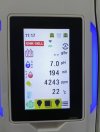
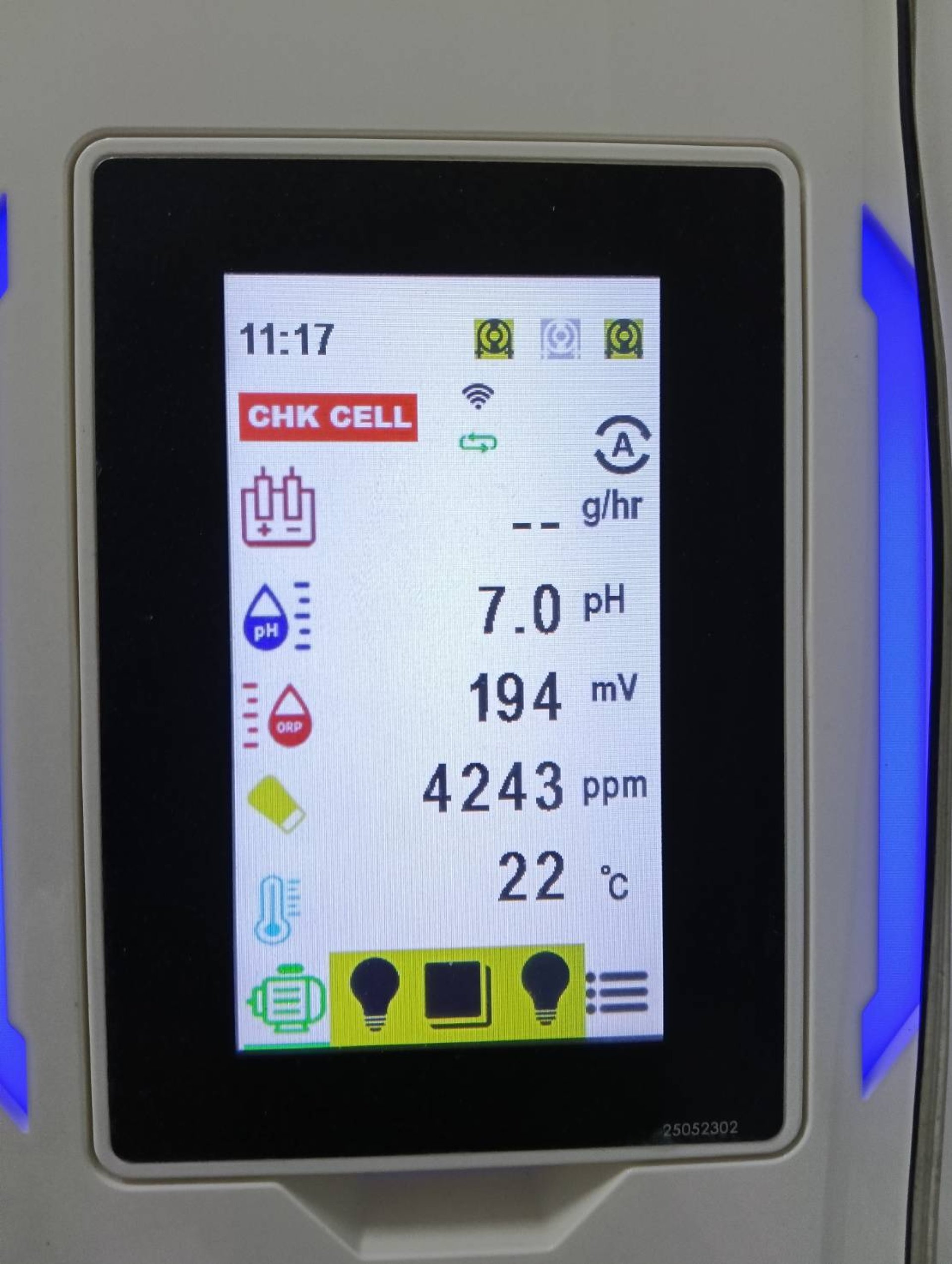
However, many users may encounter warning messages such as: Check Cell, Check Water Level of Cell, Electrolysis Pause / g/hr.
These issues typically stop chlorine production and often lead to confusion for the owner or technician: Is the cell broken?
In this article, we will explain the actual causes and provide simple solutions you can apply immediately.


The True Causes of the Check Cell or Check Water Level of Cell Message
The good news is that these are usually NOT problems with the cell itself or equipment damage, especially with newly installed units. There are only two main causes commonly found:


1) Insufficient Water Flow through the Cell (Flow Not Reaching Sensor)
This is the most common cause, found in over 80% of customer homes.


Water must be flowing through the cell constantly while the chlorinator is producing chlorine. If the Flow Sensor does not detect flow or detects it intermittently, the unit will immediately shut down for safety, resulting in warning messages such as: Check Cell, Check Water Level of Cell, Electrolysis PAUSE, Chlorine Production = g/hr.
Sub-causes leading to insufficient flow: The water pump is not running at that time (according to the Schedule), valves are not fully open, the filter is clogged (pressure drop), air is trapped in the pipes (Air Lock), or the system is newly installed and the water circulation is not yet stable.
**Solution:** Run the water pump to test for consistent flow. Fully open all valves. Perform Backwash or check filter pressure. Purge air from pipes and cell. Run the water circulation continuously for at least 12 hours before retesting.


2) Loose / Unlatched Cell Cable Connector
This is a common issue in newly installed pools.


If the cell plug is slightly loose, the system will not send power to the cell, resulting in no chlorine production and the "Check Cell" message.
**Solution:** Disconnect and firmly reconnect the cell cable until you hear a "click." Check that the connector surface is dry and free of water or moisture. Arrange the cable so it is not strained or kinked.

Overlooked Secondary Cause
Based on the experience of the Winwinpool team, many warnings occur simply because the unit is in **Pause Mode** and not due to an actual error.
For example:
The water pump is running intermittently (according to Schedule).
If you check the app when the pump is off, water is not flowing, the unit is paused, and the "Check Cell" warning appearsthis is normal.
When Flow / Cover / Winter mode is active.
In Flow mode, the unit will only produce chlorine when water is flowing.

Real-World Customer Example
Several customers checked the CyberSync app and found Electrolysis = PAUSE g/hr with the "Check Water Level of Cell" message.
However, our team found that the water pump was not operating during that time because the Schedule was set to intermittent periods. Therefore, there was no flow through the cell, and the unit displayed the warning.
When the water pump was turned on and flow returned, chlorine production resumed normally, and the warning immediately disappeared.

Simple Summary
The "Check Cell" issue on the Emaux CyberSync is caused by **no water flow through the cell** or a **loose cell connection**, not a broken cell. It often happens during periods when the water pump is not running according to the programmed schedule.

Solutions you can apply immediately:

  1. Turn on the water pump and check if water is flowing through the cell.
  2. Purge air from the pipe system (Air Lock).
  3. Check the filter pressure.
  4. Ensure the cell connector is firmly secured.
  5. Set the water pump schedule to run continuously for at least 8-12 hours per day.


Related Content
 “Salt Chlorinator Cell Housing Cracked… The Real Cause Is NOT a Bad Machine — It’s When the Unit Runs Without Water Flow!” Many pool owners experience this and get shocked…
A cracked or burst salt chlorinator cell housing is a problem that shocks many pool owners. The chlorinator appears to be running normally, but suddenly you hear a loud “pop,” followed by water leaking from the system. Many people assume the unit is low quality, but in most cases, the real cause is not the machine itself — it is when the salt chlorinator continues operating without actual water flow through the cell. Even when water is not flowing, salt water may still remain trapped inside the cell housing. If the chlorinator keeps producing chlorine from this trapped water, chlorine quickly turns into chlorine gas. The gas pressure builds up rapidly inside the housing, which can eventually crack or explode the clear plastic outer chamber. The most common situations include: (1) closing the inlet and outlet valves during pool vacuuming to prevent sediment from entering the cell, then forgetting to reopen them; and (2) running filter backwash in AUTO mode where the pump and chlorinator operate together, but the water flows directly to the waste line instead of passing through the cell. This issue is especially common in models that use electrode-type water sensing, which can be inaccurate when water is trapped but not flowing. The best solution is choosing a salt chlorinator with a real Flow Switch, such as the Laswim SR Series. A Flow Switch instantly stops operation when there is no real water flow, significantly reducing the risk of cracking, leakage, and costly repairs while extending the equipment lifespan.
Leaving Home for 7-10 Days During the New Year How to Maintain Your Swimming Pool So Its Clear and Ready to Swim When You Return
The New Year holiday is a time when many families travel to other provinces or overseas, leaving their homes unoccupied for several days. For homeowners with swimming pools, this often leads to concerns that the water may turn green, develop unpleasant odors, or require costly cleaning and water replacement upon return. In reality, closing a swimming pool for 7–10 days is not difficult if the correct water care principles are applied. The key is proper water preparation before leaving, using the right chemicals to work in place of daily maintenance. This approach helps control algae growth, bacteria, and the accumulation of dirt during periods when the pool is not in use. This one-time, 10-day pool care method is designed for residential pools and can be applied to both homes without automatic control systems and those equipped with Smart Home or Smart App monitoring. It allows pool owners to reduce system operation while still maintaining stable water quality throughout the holiday period. When chemicals are selected correctly and adjusted according to pool size, homeowners can return from their trip to find clear, clean water. With minimal effort—such as vacuuming settled debris—the pool is ready for immediate use, eliminating the need for draining or refilling and ensuring a stress-free return home.
⭐ **WATERSTOP for Swimming Pool Construction Selection Guide + Specifications (Winwinpool Standard by Pool Size & Concrete Thickness)**
⭐ How to Choose the Right Waterstop for Swimming Pools Selecting the proper waterstop is essential for preventing leakage through concrete joints in swimming pool structures, including floor-to-wall joints, construction joints, and areas with structural movement such as expansion joints. Choosing the correct size and thickness helps ensure long-term waterproofing performance and extends the overall lifespan of the pool. The selection should always match the thickness of the pool wall or slab. For example, 6-inch waterstops are suitable for 15–20 cm concrete walls, while 8-inch models are recommended for 20–25 cm walls. Rib design and thickness are equally important: triple-rib models provide stronger anchorage and are ideal for high-pressure or movement-prone areas, whereas double-rib models suit general construction joints. Winwinpool classifies its waterstops into six types—Type A, AA, B, BB, C, and CC—allowing engineers, contractors, and homeowners to select the most appropriate model according to structural requirements and pool design standards.
icon-messenger
เว็บไซต์นี้มีการใช้งานคุกกี้ เพื่อเพิ่มประสิทธิภาพและประสบการณ์ที่ดีในการใช้งานเว็บไซต์ของท่าน ท่านสามารถอ่านรายละเอียดเพิ่มเติมได้ที่ Privacy Policy and Cookies Policy
Compare product
0/4
Remove all
Compare