AstralPool Viron Salt Chlorinator Shows NO FLOW How to Fix It?
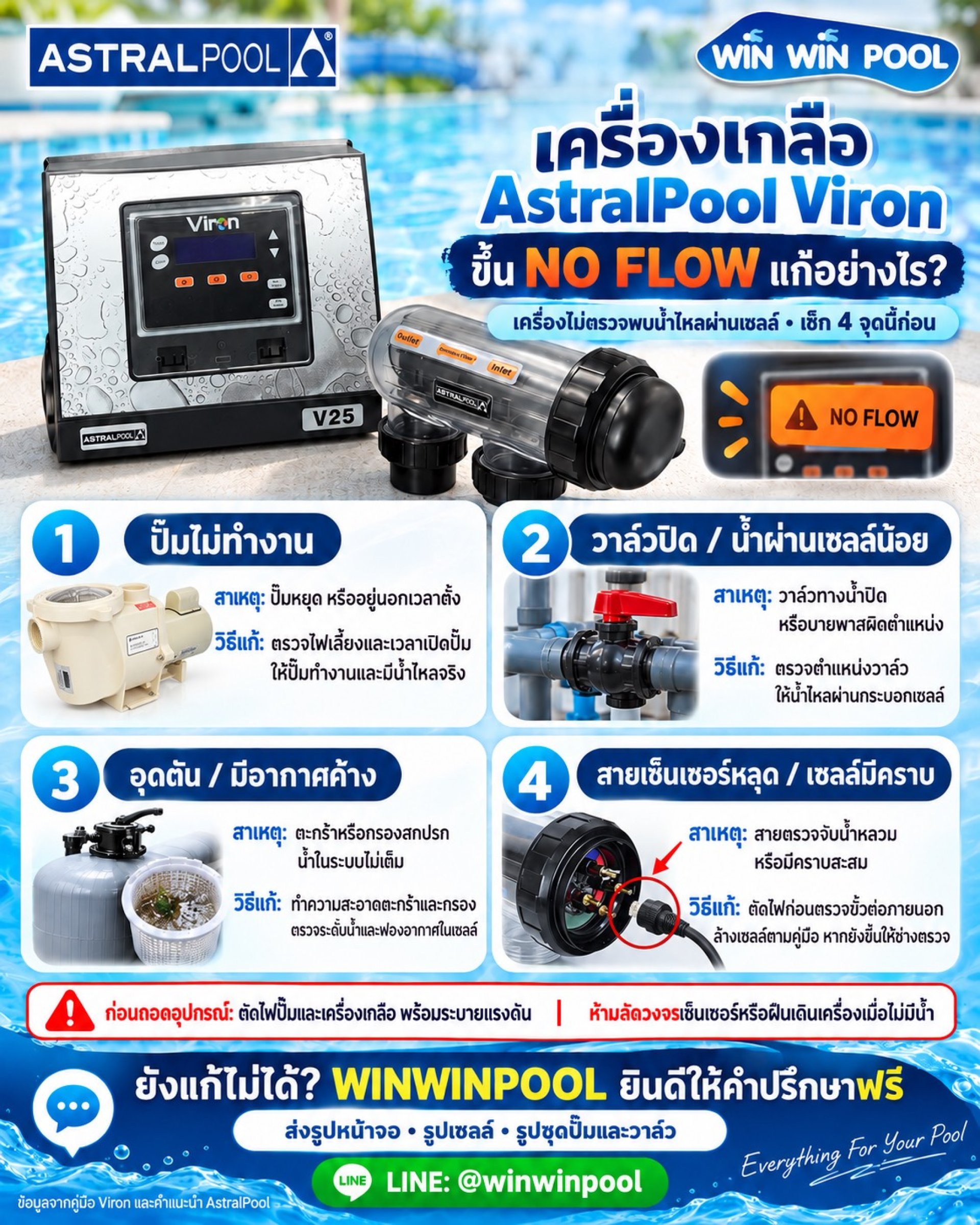
AstralPool Viron Salt Chlorinator Shows NO FLOW How to Fix It?
A simple troubleshooting guide for checking an AstralPool Viron salt chlorinator when the system displays a NO FLOW warning.
When an AstralPool Viron salt chlorinator displays NO FLOW, it means the system is detecting insufficient water flow through the cell, or it is unable to detect the water flow correctly.
Before removing any equipment or calling for service, you can start by checking these 4 important points. The cause may be related to the pool pump, valve position, restricted water flow, trapped air, or the cell sensor connection.
4 Things to Check When AstralPool Viron Shows NO FLOW
1️ Check Whether the Pool Pump Is Running
First, check whether the pool pump is receiving power and is currently running. Also check the pump schedule or timer to confirm that it is within its operating period.
If the pump has stopped because of its programmed schedule, the NO FLOW warning may appear as part of normal system operation.
2️ Check the Valve Positions
Check the water valves and make sure they are positioned correctly. Pay particular attention to the water flow valves and bypass valve, as these can affect the amount of water passing through the salt cell.
Make sure water is actually flowing through the cell and that the bypass is not allowing too much water to bypass the cell.
3️ Check for Blocked Water Flow or Trapped Air
Restricted water flow can sometimes be caused by blockages, dirty components, or trapped air in the plumbing system. Check the following areas:
- Pump strainer basket
- Skimmer basket
- Filter and filter cartridge
- Check that the salt cell housing is filled with water and does not contain trapped air
4️ Check the Cell Sensor Cable
Check whether the sensor cable connected to the salt cell is loose or disconnected. Always switch off the power before checking external electrical connections.
If there is visible scale or buildup on the cell, clean it according to the manufacturer's instructions.
️ Important Safety Precautions
Before removing equipment or checking any part of the system, switch off the power to both the pool pump and salt chlorinator and release pressure from the plumbing system.
Do not force the system to operate when there is no water flow. Operating the equipment without sufficient water flow may cause improper operation or equipment damage.
Still Can't Fix the NO FLOW Warning?
WINWINPOOL is happy to provide free initial consultation to help you identify possible causes and determine what should be checked next.
To help our team assess the issue more accurately, please send the following information via LINE:
For pool technicians, contractors, and pool owners, save this article as a quick reference for basic troubleshooting when an AstralPool Viron salt chlorinator displays a NO FLOW warning.